Screen Time For Mac Is Terrible

Apple users are by now familiar with the feature Screen Time, a feature that tracks how you use your device and delivers reports about how long you use it and what you use it for throughout the day. Screen Time tracks these three metrics:
- What apps you’ve been using and for how long
- How many notifications you receive
- How many times you pick up your phone
Ostensibly, the purpose of Screen Time is to help people make mindful choices about how they want to use their devices. If we know how we’re really spending our time, we can make informed choices about how we want to change our use. This is especially important because the national average for screen time is about 6 hours per day and on the rise, and most people vastly underestimate the amount of time they spend on their devices. They tend to assume that other people use their devices 6+ hours a day, not themselves.
Screen Time for mobile does a pretty good job of this. I’ve loved Screen Time for mobile since it came out, and am constantly encouraging my readers to turn it on and see what their use looks like for themselves. Screen Time helped me reduce my use from 6 hours a day to a mere 30 minutes. So, when Apple announced they were making Screen Time for Mac, I was ecstatic.
I was sorely let down. Screen Time for Mac utterly fails at its purpose. It barely collects any data, and the data it does collect tells me basically nothing about my use.
Screen Time for Mac fails to collect good data in two ways:
1: It doesn’t track browser activity
Screen Time for the mobile environment is insanely useful because it’s app-based. People do the majority of the things they do with their iPhone within apps. This makes Screen Time supremely useful for the mobile environment. I know which apps I’m spending my time in and what notifications they are sending me.
Desktop computing, though, is not app-based. It hasn’t been in a long time. Unless you have a very special use case, nearly all of your desktop-based activities are taking place inside the browser. You don’t open the Facebook app, you open Facebook.com. You don’t open the Instagram app, you open Instagram.com. Outside of Slack, Spotify, and the occasional foray into Photos and some specialized tools, everything I do on my computer is done in the browser. All Screen Time has to say about that is “Brave Browser: 3h 48m.” Useless.
2: It doesn’t track open windows
Screen Time for the mobile environment only tracks the ap you have up on your screen at that moment. When you look at Screen Time on your iPhone, it is an accurate representation of how you actually utilized your time on your phone.
Screen Time for Mac, though, tracks every open application. I know this because it gives me readings like this:
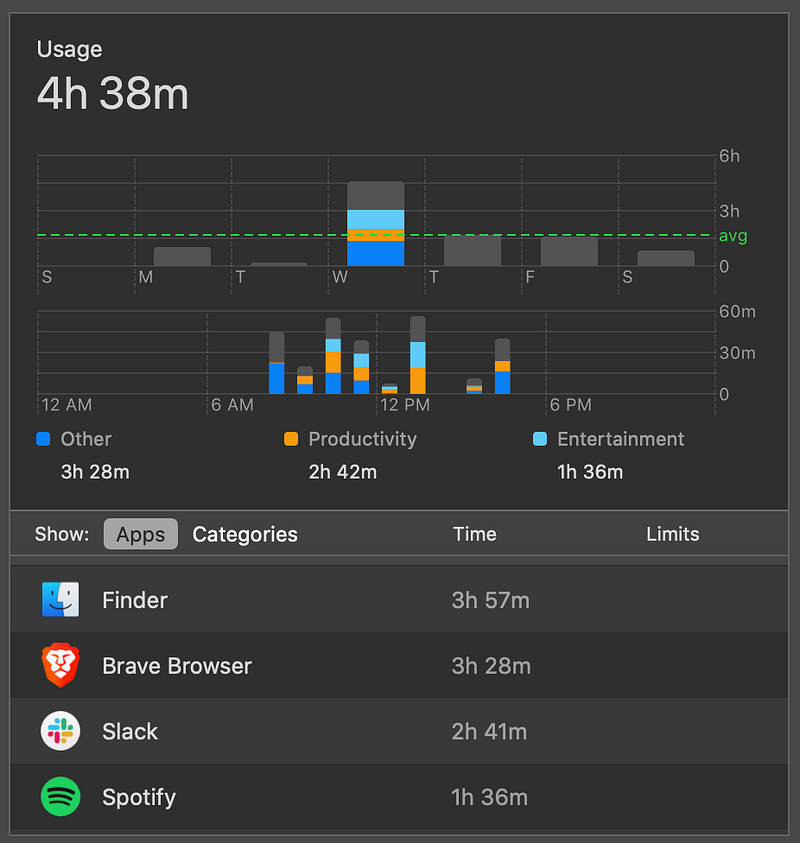
There’s no way I have Slack as my active window nearly three hours a day. I barely use my computer for three hours a day. I also don’t use Spotify that much; I leave it on in the background playing the same few songs on repeat. And I definitely didn’t spend four hours poking around Finder. But Screen Time for Mac logged it as active time spent.
Screen Time, in general, is disappointing on a few counts.
- Screen Time doesn’t allow me to categorize my own use. They force me to use their pre-selected categories.
- It’s difficult to view your use across time to get a good picture of total use.
- Screen Time doesn’t allow me to mark or tag my use as “good” or “bad.” Because of this, it’s more difficult for me to understand if I’m spending my time in productive ways.
In the mobile environment, these issues have not rendered the feature useless. But on the Mac, they have.
RescueTime Is Actually Useful
RescueTime doesn’t have these problems. By contrast, their software is actually useful. Here’s a weekly readout provided to me by RescueTime:
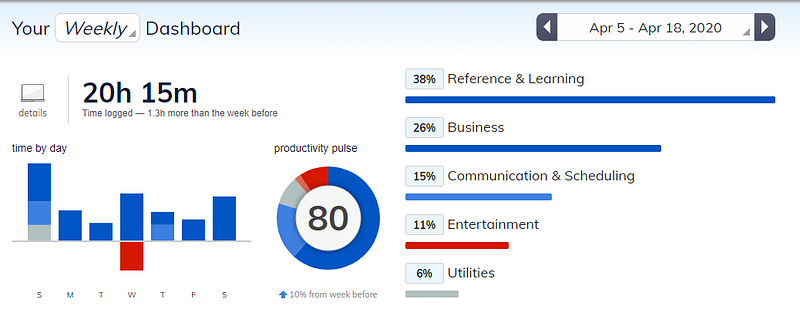
If I click into any of those categories, it shows me the exact application or website that was the active window on my computer at the time. I can find out not only how much time I spent in Brave Browser, but how much time I spent on medium.com.
RescueTime also has important features Screen Time is lacking, like:
- Categorizing my use. YouTube is not social media, damnit, it’s research. I’m learning psychology, not watching cat videos.
- Assessing whether it’s productive or unproductive. This gives me the ability to understand where my time is going at a glance. Not that one should always be productive, of course, but you can’t make decisions about your productivity if you don’t even know where your time is going.
I don’t want to use a third-party application. I try to stay away from those wherever possible. Apple usually does a great job of integrating its software and hardware, and I don’t like shoehorning in third-party software where it doesn’t fit. But Screen Time for Mac is such a disappointment, and RescueTime so clearly superior, that I have to.
If you want more stories like this, sign up for my weekly digest.
Enjoy this kind of writing?
I send one email a week about AI, intentional living, and doing meaningful work in a world that won't stop changing. Join 700 other subscribers.
Keep Reading
Your Clothes Use More Water Than Your AI
The environmental case against AI doesn't survive contact with the data
Apps Will Soon be Replaced by AI
The first new computing interface in sixty years doesn't need them.
AI Is Building the Biggest Porn Machine in History
The industry that monetizes child rape videos just got mechanized production