What My Minimalist Phone Looks Like
This is not the first time I’ve written about digital minimalism. It feels like I can’t go a week without spotting someone’s phone out of the corner of my eye, overflowing with hundreds of unseen notifications, thousands of unread emails, and surely dozens of important things going missed at any given moment. Even if nothing important is lost, the constant, unceasing torrent of blinks, beeps, and boops is surely wreaking havoc on the peace and mental health of anyone subjected to it.
The only reason my digital life isn’t the same way is that I have made a point of not allowing it to be. The only way to avoid drowning in the waterfall of stimulation is to intentionally remove yourself.
Here’s how I’ve done that:
My Home Screen
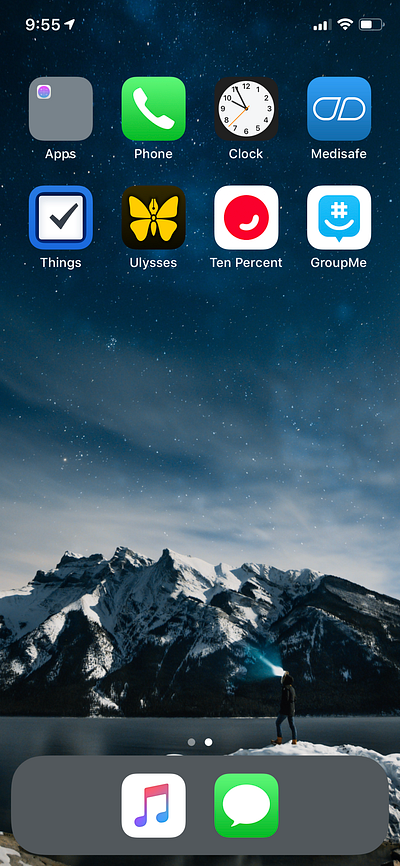
I use every app on my home screen every day (or at least, I would like to).
- Phone, Messages — Self-explanatory
- Clock — I use alarms to keep me on schedule
- Medisafe — I take medication regularly, and Medisafe helps me keep track of what I’ve taken and when
- Things — My to-do app
- Ulysses — My writing app
- Ten Percent — My meditation app
- GroupMe — The messaging app my D&D group and overseas friends use
Every other app is hidden away in a large group that has no organization whatsoever. If I want to use any of those apps, I use Spotlight to search for the exact app I want. This forces me to intentionally decide what I want and search for it, instead of just tapping an app because it’s there and I’m bored.
My Notifications
Almost every notification on my phone is turned off. Except for a few essentials (like Messages, GroupMe, Medisafe, and Settings), every single app has every kind of notification turned off. As a result, I’m getting 50 to 75 notifications a day instead of 200 or more, most of which are text messages.
When I woke up this morning, I only had three:
- a reminder to meditate (which I turned off, because those reminders do not actually cause me to meditate)
- a notification for a chess app (which I don’t use anymore, so I deleted the app)
- a reminder to update my iPhone software, which I did before writing this article
My Widgets
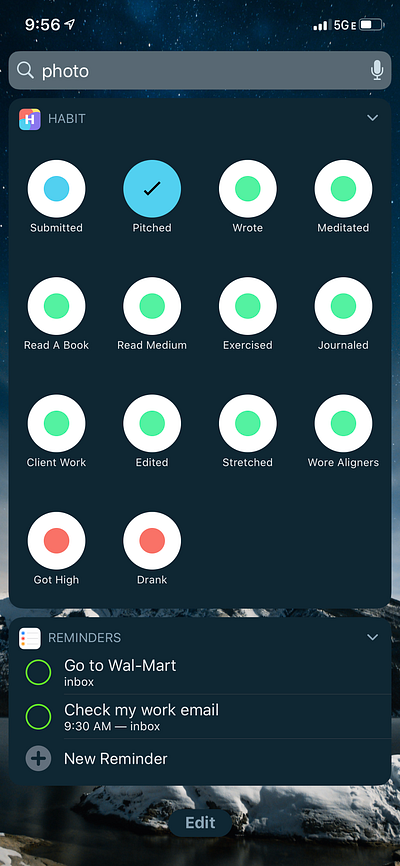
I have two widgets: my habit-tracking app and reminders.
Habit Tracking
I recently published an article about why I track certain habits daily. I track these habits using the widget for the app Habit — Daily Tracker. It allows me to see which tasks I’ve completed for the day and which I haven’t.
Reminders
If I need to get something done today, like running an errand or performing a regular, recurring task, Reminders is how I make sure I get it done. Instead of setting an annoying phone alarm to make sure it happens, I use Reminders.
My minimalist phone works for these reasons:
I decide when to use my phone, not my phone.
When you get a notification, it’s the same thing as your phone tapping you on the shoulder saying “use me!”
Personally, I don’t want my phone tapping me on the shoulder all day. I want my phone to leave me alone until I’m ready to pick it up. My phone is configured so that it is tapping me on the shoulder as little as possible so I can wait until I’m ready.
When I do use my phone, it’s because it’s good for me.
When your phone does tap you on the shoulder, it isn’t because your phone has anything useful for you. On the contrary, it usually has something useful for someone else; notifications for coupons that help stores sell products, notifications about posts from acquaintances and ex-friends you don’t need to see, notifications from games that want you to waste your time, and notifications from apps to spend money on in-app purchases.
I don’t want my phone to tell me about things that are good for other people. I want my phone to tell me about things that are good for me. My phone is configured so that only notifications which improve my life are allowed through, not notifications that improve the lives of others.
When I do use my phone, it’s not for long.
Apps are engineered so that you spend as much time on them as possible. Social media is designed to have endless scrolling, buttons are placed right where it’s easiest to tap, and apps are full of bright and stimulating colors.
To mitigate this, I hide almost every app in one large group. Unless I specifically search for an app to open it, my eyes don’t see it and I don’t use it.
How I Made My Phone Minimalist
My phone didn’t get minimalist overnight. If my phone is minimalist now, the phone I started with was maximalist; in 2016, I spent upwards of seven hours a day on my phone, most of it on Instagram and Tumblr. By 2018, that had only dropped to six hours a day.
Eventually, I realized something had to be done. I spent six months experimenting with every ‘phone minimalist’ hack: grouping my apps by category, grouping them by color, making my phone black and white, deleting my social media apps, all to no avail. It wasn’t until I created a system for breaking my phone addiction that I was able to get my phone use down to two hours a day.
The 5 Step Guide to Breaking Your Phone Addiction, For GoodHow to keep social media apps from stealing your time through triggers and habit replacement.medium.com
But I didn’t stop there. After a breakup with a man who treated Snapchat like it was more important than water, I decided Snapchat wasn’t making my life any better and decided to delete it. Then I realized that hell, none of my social media was making my life any better, and deleted the rest of it as well.
Why I’ve Deleted All My Social MediaIt’s all gone and I am so happy.medium.com
It’s been ten months since I did that, and I don’t regret it at all.
Other things I did to minimize my phone:
I deleted all my entertaining apps
One of the steps in my 5-Step Guide To Breaking Your Phone Addiction is to delete all your annoying phone games and replace them with educational phone games like Duolingo and Brilliant. It was a great idea; instead of spending time scrolling social media or playing dumb Ketchapp games, I was learning Spanish and improving my ability to do mental math.
But while I think Duolingo and Brilliant are great apps, the time came when I was ready to say goodbye to them and stop spending time on my phone at all.
I turned off notifications for what remained
Most apps have notifications that don’t make your life any better. Notifications about weekend point specials. Reminders that you haven’t “checked your feed” in a while. Notifications about Cyber Monday deals. You don’t need to see any of these. Neither do I. So I turned them off, all of them, notifications and badges and all.
I hid apps I don’t use every day in a group (and learned to use spotlight)
The whole point is to use my phone when I want to, not when my phone wants me to — so there’s no reason for apps to be cluttering up my phone. I filed them all away the same way one would file paperwork, and when I want to use a certain app, I use Spotlight to find it. This keeps me focused on what I want to do and gets me off my phone as fast as possible.
Thanks to all these phone interventions, the amount of time I spend on my phone per day is counted not in hours, but in minutes — usually 55 per day, but sometimes as low as 30. I’ve reclaimed six hours a day, or 36 hours a week, time I now spend writing, reading, exercising, and spending time with loved ones. My life is significantly more fulfilling, all because I was able to untether from my phone.
See Part 2 In The Series:
What My Minimalist Laptop Looks LikeHow I keep myself on-task and focused on workmedium.comm
Want to break your phone addiction?
If you use your phone way too much and you know it, my free email course Break Your Phone Addiction In 7 Days will help you stop once and for all.
Enjoy this kind of writing?
I send one email a week about AI, intentional living, and doing meaningful work in a world that won't stop changing. Join 700 other subscribers.
Keep Reading
Your Clothes Use More Water Than Your AI
The environmental case against AI doesn't survive contact with the data
Apps Will Soon be Replaced by AI
The first new computing interface in sixty years doesn't need them.
AI Is Building the Biggest Porn Machine in History
The industry that monetizes child rape videos just got mechanized production